The governed AI portal for back-office teams

Your prompts, agents and scripts as
one-click service items your whole team can run.

Every run governed, costed, and audited. AI results, not AI chats!

Supports:
  • Salesforce
  • HubSpot
  • NetSuite
  • QuickBooks
  • Xero
  • Maxio
01 You author the prompt, script, or agent
netridium.com/build
# monthly-close-summary — you author it once
source QuickBooks, Xero
pull P&L, balances, AR aging
flag variances > 5%
output xlsx

02 Your team runs it as a service item
netridium.com/run
Monthly Close Summary
run · view results · never sees the prompt
Completed close_summary.xlsx · Jun 2026
Net revenue$482,100
Operating variance+6.2%
Flagged for review3 items
audited · cost center FIN‑100 · $0.04 charged back
Product

An AI portal and service catalog for your back office

IT staff, consultants, or MSPs author a prompt, script, or agent once, then publish it as a service item their users can just run — close, reconciliation, AR aging, revenue reporting. Users get results without touching prompts, credentials, or underlying systems: governed by default, costed per run, multi-tenant from day one.

All through industry standard MCP servers.

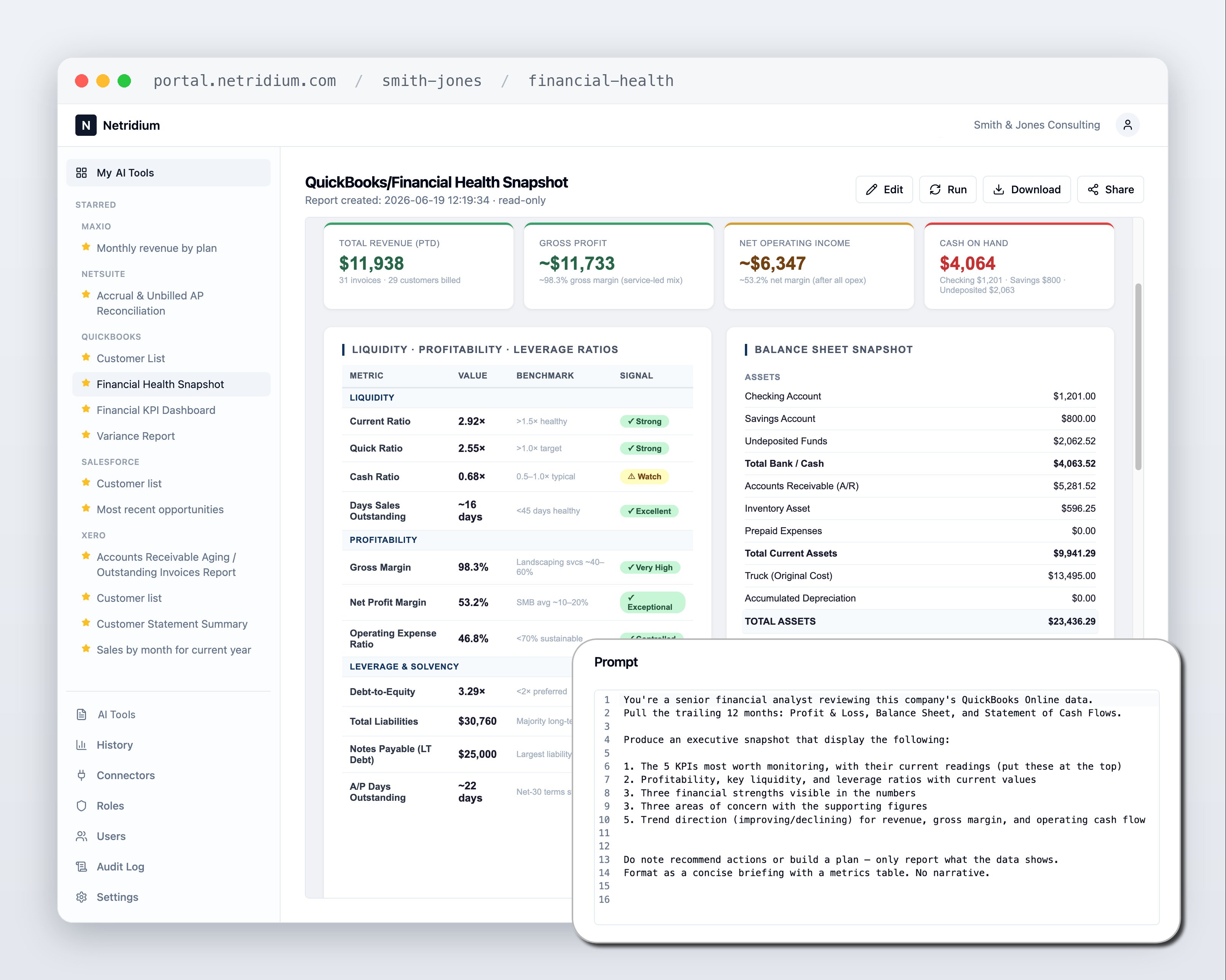
Netridium — a QuickBooks Financial Health Snapshot report shown in the portal
A one-click service item returns a QuickBooks Financial Health Snapshot.
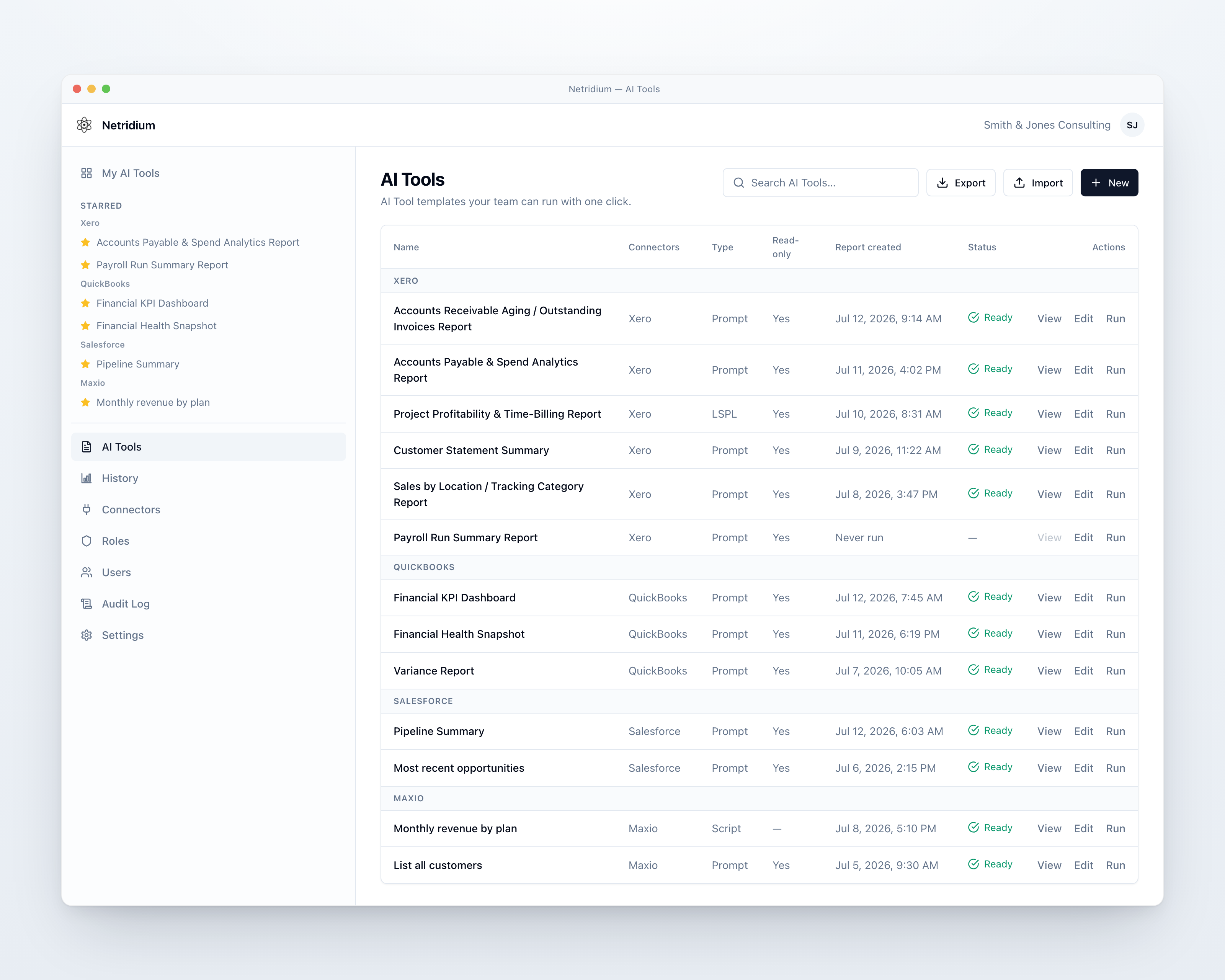
Netridium AI tools catalog — prompts, LSPL and scripts grouped by Xero, QuickBooks, Salesforce and Maxio connectors, each with View, Edit and Run actions
One catalog of service items — prompts, agents, LSPL and Python scripts across every connector — that your team runs with one click.
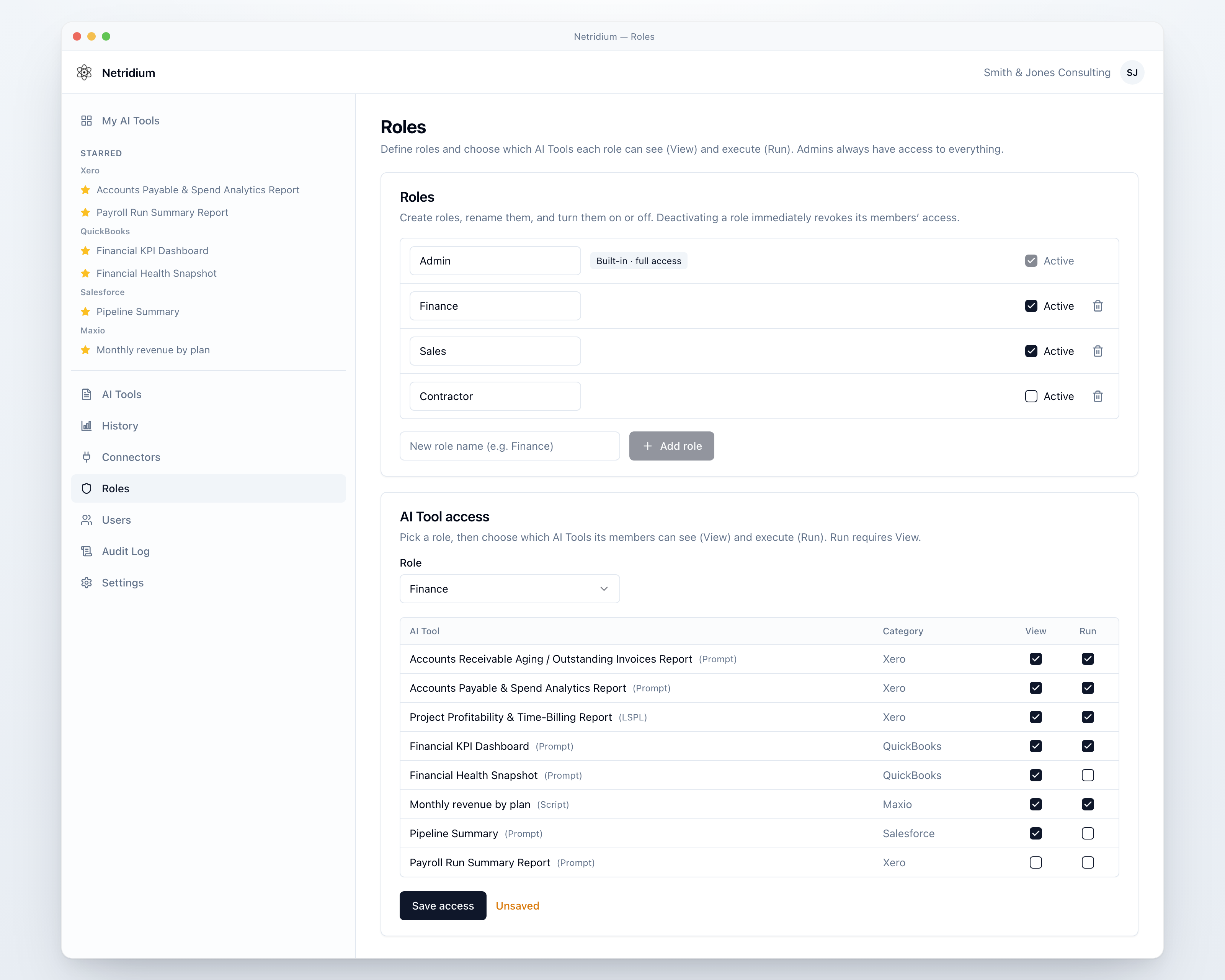
Netridium Roles screen — Admin, Finance, Sales and Contractor roles with a per-AI-tool matrix granting View and Run access
Role-based access — grant View and Run precisely, per AI tool, per role.

Built for the people who answer to auditors.

  • Role-based access
  • Budgets & cost centers
  • Chargeback to your GL
  • Full audit trail

No developers required.

Authoring

Author a service item three ways

Every service item shares the same plumbing — MCP connectors, the run queue, input forms, live status, budgets, audit, downloadable output. They differ in who owns the control flow.

Prompt / agent (natural language)

Describe the outcome.

Plain English. The model acts as the agent — it orchestrates your connectors, works out the steps, and picks the best output format. Fastest to author; supports model tiers and batch.

# Prompt — the agent owns the plan
List all active subscriptions grouped
by product, with MRR per group,
as an Excel sheet.
LogicScript Prompt Language (structured)

Write the steps; the AI runs them.

Full support for LSPL, executed in direct-execution mode — the AI reads each line and acts on it, reasoning at each AI.call, branching at each IF. Explicit and repeatable.

FUNC run(ticket)
  VALIDATE ticket.subject not empty
  DO
    c = AI.call("Classify this ticket")
    IF c.canResolve IS yes
      RETURN AI.call("Draft a reply")
    EMIT NeedsHuman { reason: "low conf." }
  RETURN "escalated"
Script (python)

Full deterministic control.

Python in a secure sandbox for exact calculations and logic the AI shouldn't improvise. Call connectors with mcp(...), reach for the model only where you want judgement, and emit(...).

rows = await mcp("Maxio").call(
    "advancedBillingShowCustomers",
    {"per_page": 20})
emit({"type": "excel",
  "sheets": [{"name": "Customers",
    "data": rows}]})

Prompt = "what I want," LSPL = "the steps to take," Script = "exactly how to do it." Whichever you pick, it publishes as the same one-click service item — same permissions, same budgets, same audit record. Don't want to start from scratch? Describe what you want and the portal generates a runnable script using the real tools your connectors expose — so tool names and parameters are correct, not guessed.

Parameterized tools

Add a form. Make it self-service.

Declare a few inputs and one service item serves many cases. The user fills a short form up front; the values are validated, then woven into the run. No prompt editing, no guesswork.

Field types
Text Number Yes / No Date Dropdown
In the script body, reference a value as {{key}}
Reconcile account(s) {{accounts}} for the
period {{period_start}} to {{period_end}}.
Flag mismatches; return a status + comments.

## Inputs provided for this run
- accounts: 1000, 1200, 2050
- period_start: 2026-05-01
- include_notes: true

Every value is also appended as a labelled block — a safety net so the model sees it even without a placeholder. Validated in the dialog and again on the server.

How it works

Build → Publish → Run

The builder / consumer split: the person who authors a capability is not the person who runs it. Build once; publish it as a service item; let everyone run it safely — governed, costed, and audited every time.

01 · Build

Author against your systems.

IT, consultants, and accountants build a prompt, agent, LSPL script, or Python — pick the connectors it may use, add inputs, set the output, set the budget. Save before you run, so what executes is the saved version.

# close_summary · type: lspl
connectors:  QuickBooks, Xero
inputs:      period (date)
access:      read-only
budget:      $0.25 / run
costcenter:  FIN-100
output:      xlsx
02 · Publish

Grant View and Run, per service item.

Roles control who can see a service item versus who can run it. Publish to one workspace or every client tenant — and revoke or change it for everyone at once.

close_summary → acme-corp globex initech +12
can build can run can see (run only)
03 · Run

End users just click run.

Fill the form, click Run, get a finished report. Every run is asynchronous, recorded in the audit log, costed to a cost center, and replayable — and notifies whoever needs it.

Ready in 4.2s
[14:02:11] auth: alice@acme · role=runner
[14:02:11] input: period=2026-05
[14:02:15] output: close_summary.xlsx · 3 flags
[14:02:15] audit: recorded · cost $0.04 → FIN-100
Builders

IT, consultants, accountants & MSPs

Build tools against deep domain knowledge, wire up connectors, add input forms, test, version, and publish — from one console.

  • Prompt, agent, LSPL, or Python — your choice per service item
  • Generate a runnable script from a description — no developers required
  • Export / import service items as portable files between workspaces
Runners

Your whole team

No technical knowledge needed. Open My Reports, search the catalog, fill a short form, and click Run — a finished report comes back, every time.

  • One click → a result; never see the prompt
  • Live status that survives navigating away
  • Searchable results with links back to the source system
Connectors

Connected to your systems of record

Depth over breadth — back-office finance and operations done exceptionally well. Each workspace connects its own accounts over MCP; credentials are encrypted and never shared across tenants.

One-click OAuth — connect & authorize, no API keys
Salesforce Xero QuickBooks Online
Add a connector — OAuth or a service URL / token
Google Drive · OAuth Maxio · MCP URL + OAuth NetSuite · MCP URL + token

Read-only by default; write access granted explicitly, per connector. Roadmap: Microsoft 365, HubSpot, and more.

AI economics

Costed per run. Charged back to your GL.

AI spend that finance can actually account for. Every run carries a budget before it starts and a cost after it ends — attributed to the user, the service item, and the cost center that asked for it.

Chargeback — June 2026 ready to post
Cost center GL account Runs Amount
FIN-100 · Accounting 6820 412 $318.40
SLS-220 · Sales Ops 6820 186 $142.75
OPS-310 · Supply Chain 6825 97 $74.10
Total charged back 695 $535.25
Export to CSV · every line traces to a run in the audit log
What finance gets
  • Budgets and fail-closed caps per run, per service item, per workspace
  • Cost centers assigned at publish time — the runner never picks the code
  • Chargeback lines that reconcile to your GL accounts
  • Per-tenant rollups for service providers rebilling clients
  • BYOK on Enterprise — run on your own provider key and keep the spend in your contract

Model tiers and batch mode cut the bill before it's ever incurred: route simple jobs to a fast model, run non-urgent work in batch at roughly half the cost.

Governance, security & trust

Governance isn't a feature. It's the product.

Built for the people who answer to auditors — the reason to choose a governed portal over handing staff raw ChatGPT or Claude logins.

◆

Role-based access control

Grant View and Run precisely, per AI tool. Invite users by email with optional approval, assign roles, and publish a capability to exactly the right people.

◎

Complete audit trail

Who ran what against which data, every connector call, every admin change — all recorded, with the cost and cost center on every line. You always know who did what, and what it cost.

▲

Read-only by default

Connectors are read-only out of the box. Write access is granted explicitly, per connector — a tool can never change data through a connector that isn't write-enabled.

▣

Secret-less sandboxed execution

Python runs in an isolated sandbox with no access to platform secrets. A trusted broker injects credentials per call and tears them down when the run ends — tools never hold your keys.

▩

Multi-tenant isolation by design

Every workspace's data, connectors, tools, and results are isolated at the database level and never cross into another — the same guarantee that powers the channel model.

●

Budgets, cost centers & allow-listing

Per-run token and call budgets with fail-closed enforcement, so a runaway job can't loop forever or run up a bill. Spend lands on a cost center; only approved models can be used.

Platform

One platform, from author to one click

Build a capability once against your systems of record. Publish it as a service item to exactly the right people. One click and they get a finished report back.

▥

Self-service input forms

Add a short form to any service item — Text, Number, Yes/No, Date, or Dropdown. Users pick a date range or an account and click Run. Inputs are validated before the run ever starts.

▦

Systems of record, connected

NetSuite, Salesforce, Maxio, QuickBooks Online, Xero, and Google Drive over the Model Context Protocol. Each workspace connects its own accounts — credentials never cross tenants.

▤

Results that fit the work

Excel (multi-tab, searchable), formatted HTML, print-ready PDF, charts, plain text, or JSON. Record IDs link straight back to the source system; download with one click.

◐

Run now, or on a schedule

Run on demand, or automatically — daily, weekly, or monthly in the timezone you choose. Scheduled runs land in History with a badge and notify the right people.

◔

Live status & full history

Runs are asynchronous: Queued → Running → Ready (or Failed). Status follows you across the app. History keeps every run's inputs, result, and cost — re-open, re-run, or cancel.

◉

Share results, safely

Share a finished report through a secure link that opens an access-controlled viewer — never a raw file. Optional email notifications fire when a run finishes or fails.
Book a live demo.

See how Netridium publishes your prompts, scripts, and agents as governed service items your whole team can run — costed and audited on every run. Tell us a bit about you and we'll be in touch.